Google rolls out Gemini for Gmail with AI Overviews, starting with US

Your inbox is about to become a whole lot more opinionated. Not with another label you can ignore, but with Google's goal of determining what you should do next and what you can safely stop reading.
On January 8, 2026, Google announced a new wave of Gemini-powered Gmail features, which revolve around three moves: a new AI Inbox, AI Overviews (summaries and search Q&A), and upgraded writing tools like Help Me Write, Suggested Replies, and Proofread. The first wave is U.S.-only and English-only, and key parts are desktop web-only at launch.
Who gets this right now
AI Overviews in Gmail search: U.S. + English, desktop web. Requires Google AI Pro or Google AI Ultra, and needs Gmail smart features enabled.
AI Inbox: Rolling out to “trusted testers” in the U.S. on browsers. Currently consumer Gmail only (not Workspace).
Thread Summaries + Writing Tools: Google says these are rolling out to everyone at no cost for consumer Gmail as availability expands.
AI Inbox: Gmail turns into a briefing
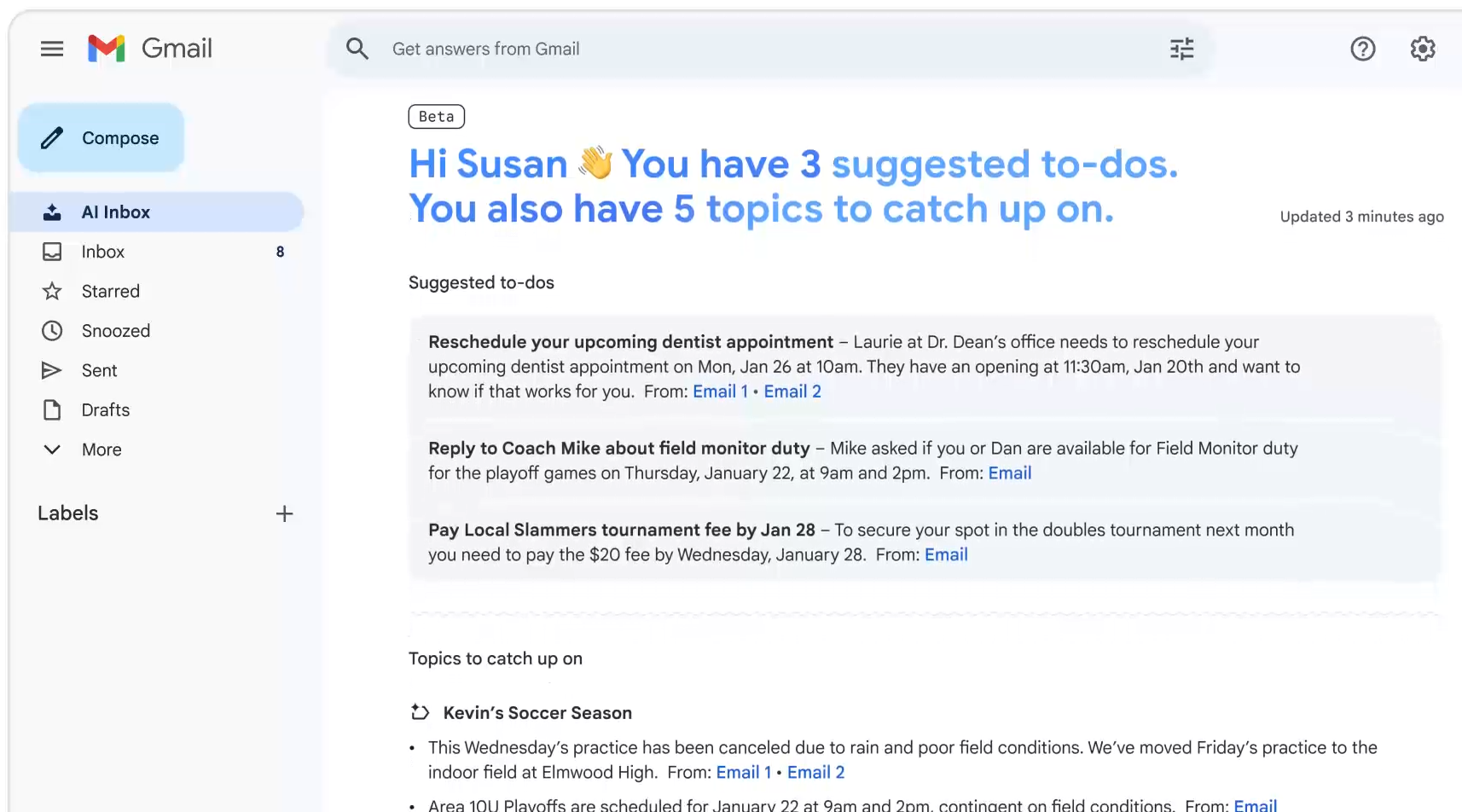
The most significant change is the AI Inbox. Instead of a standard list of emails, Gmail generates a personalized snapshot: suggested to-dos (reply, schedule, pay) and topics to catch up on, linking back to the original email.
The feature is still early. Coverage notes there’s currently no way to mark tasks as completed, and it’s launching to a limited “trusted tester” group first, meaning most users won’t see it immediately even if they’re in the U.S.
AI Overviews: Thread summaries, plus “ask your inbox”
For most people, the easiest win is AI Overviews for thread summaries or a TL;DR at the top of long conversations so you don’t have to scroll through pages of replies. Google says those summaries are rolling out to consumer users at no extra cost.
The more powerful feature lives inside Gmail search. You can type a natural-language question and Gmail can generate an AI Overview above your search results, synthesizing information across multiple emails to answer directly.
The Catch: If you use classic search operators like from or are unread, Gmail won’t show an AI Overview in search.
Writing Tools: Faster drafts, more natural replies
Google is widening access to Gemini writing help. Help Me Write can draft or polish emails, while Suggested Replies are becoming more context-aware and tone-matching. Paid users also get Proofread, which goes beyond basic spellcheck with deeper tone, clarity, and structure suggestions.
Pricing: What is free vs. paid?
Free for consumer Gmail (as it rolls out):
Thread summaries (AI Overviews for conversations)
Help Me Write Suggested
Replies with personalization
Requires a subscription:
AI Overviews in Gmail search (ask-your-inbox Q&A)
Proofread
On Price: Google AI Pro ($19.99/mo) is the mainstream tier most readers should think about for Gmail’s paid add-ons.
(Google AI Ultra is a separate $249.99/month premium bundle aimed at heavy users, not a “Gmail plan.”)
How to turn it on AI Overviews in Gmail Search
1. Requirements: U.S., English, desktop web, Google AI Pro/Ultra, Smart features ON (Settings > General > Smart features and personalization).
2. Path: Gmail (web) >Search bar > type a natural-language question > Enter.
AI Inbox
Access: Currently invite-only for “trusted testers.” If you’re included, you’ll typically see AI Inbox appear as a new view in Gmail on the web (or via an in-product prompt / email notice). Workspace users can also watch Workspace Labs—Google’s trusted tester program for Gmail AI features.
The Two Big Questions: Privacy and Accuracy
Google says these features come with privacy controls and that you can disable AI/smart features. However, Google acknowledges the obvious: Gemini can still make mistakes. Gmail displays a warning that the AI may be wrong, an important reminder that a confident summary isn’t the same thing as ground truth.
What happens next
Google says the rollout starts in the U.S. and English, with more regions and languages coming later. Workspace users aren’t included in AI Inbox yet, but Google intends to bring these capabilities to Workspace over time.
Y. Anush Reddy is a contributor to this blog.