Microsoft Edge Gets an AI-First Copilot UI Redesign

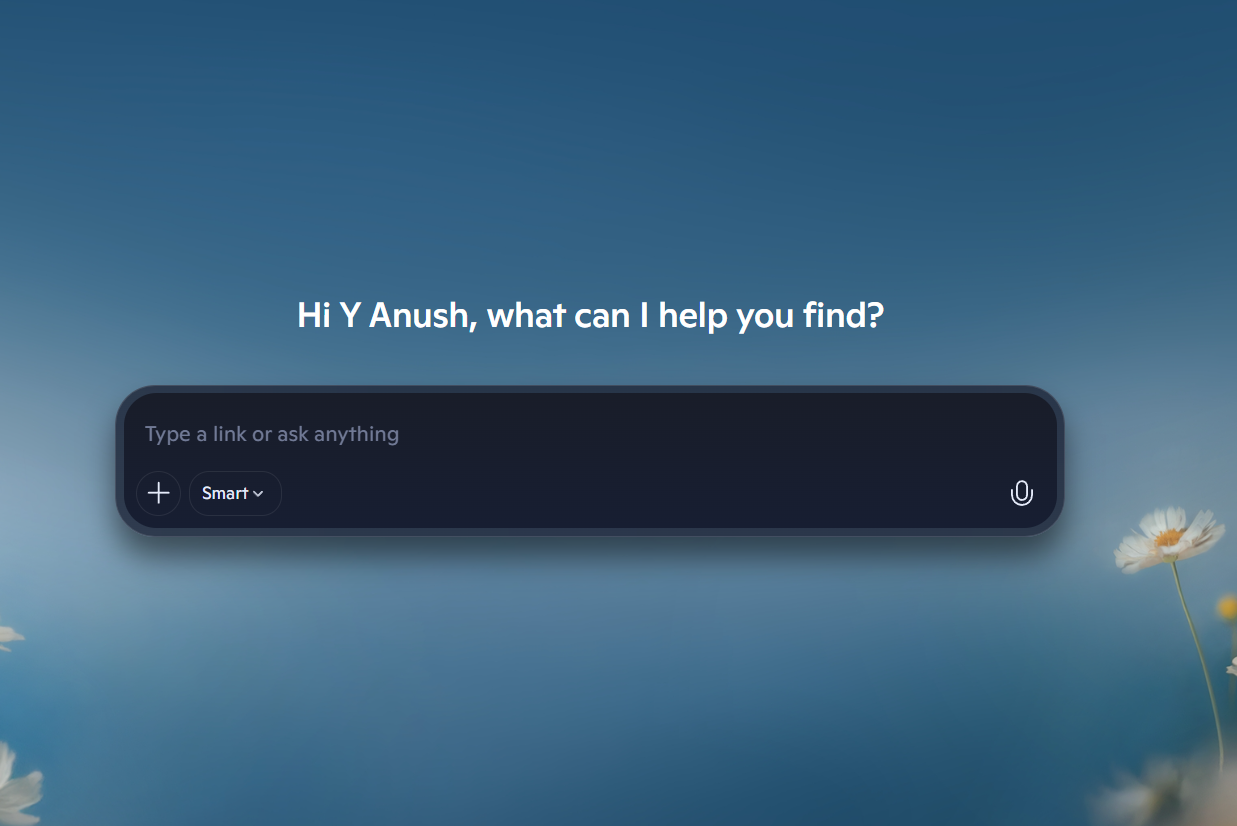
Microsoft is testing a major Copilot redesign for Edge, and it gives the browser a completely new AI-first look, from menus to Settings to a new tab page that is available in Canary and Dev channels, as first reported by Windows Central.
However, that is only the surface story. The deeper signal is how all of this affects typical web browsing behavior, from “open tabs, hunt, click” to “ask, decide, act” within the browser itself.
In early testing, the redesign shows up whether Copilot Mode is enabled or disabled. The key exception occurs when the user has Copilot Mode off. The new tab page returns to a more traditional style layout.
That split is significant. It suggests Microsoft is separating the Copilot UI from Copilot-specific “AI browsing modes”, preparing Edge to feel native to Copilot even when users aren't actively trying to use AI.
What changes, exactly? Settings, Menus, and the New Tab Page
In the current preview, Microsoft is applying Copilot’s design language across the surfaces that shape daily browsing muscle memory:
Settings gets a Copilot-like layout. The Settings area is being updated to have the visual hierarchy of Copilot panels, giving Edge a Copilot look in the place users visit for privacy, defaults, and extensions.
Context menus and dropdowns are redesigned. Right-click menus and dropdowns follow Copilot styling, including rounder corners and updated spacing and typography.
The new tab page becomes Copilot-forward. Depending on whether you are in or out of Copilot Mode, the experience shifts. With Copilot Mode off, Edge defaults back to a classic layout emphasizing MSN content and Bing search.
Color and fonts are being unified. The redesign pulls Edge toward Copilot’s palette and font styling rather than the current Edge identity.
Two operational details suggest this is still an experiment rather than an imminent launch:
1. The rollout is uneven in preview, suggesting staged testing and feedback collection.
2. Even if Microsoft likes what it sees, it’s still likely weeks away from reaching the stable version of Edge.
The Strategy: Why Edge is Adopting the Copilot UI
A browser redesign might seem like just a skin, but Copilot’s design is more than that. Windows Central notes it is a departure from Microsoft’s Fluent Design system used in Windows 11.
So why bring it into Edge?
Because UI is where behavior changes start. If the browser looks Copilot-native, the “default next step” shifts toward asking for help, summaries, comparisons, decisions, and actions, without a big “turn on AI” moment.
This matches how Microsoft has framed Copilot Mode in Edge: an “AI-first browsing experience” that can anticipate next steps and streamline how users search, read, and navigate. The redesign reads like a broader attempt to normalize that experience.
Here is the clean mental model:
The UI Layer: What Edge looks like, where your attention goes, and what the browser subtly nudges you to do next.
The Feature Layer: Actual capabilities like Copilot Mode and actions that change what Edge can do.
This update is primarily a UI Layer move. And these moves often arrive right before a product pushes more ambitious Feature Layer behavior.
That behavior is already being explored. Recent Copilot Mode coverage has positioned Copilot in Edge toward agent-like tasks like unsubscribing from emails or booking a reservation, though reliability and permissions are still evolving.
This aligns with Microsoft AI CEO Mustafa Suleyman’s reported strategy: evolve Edge rather than ship a separate “AI browser.” You don’t launch a new product; you make the existing one feel like the new category.
Windows Central also points to the redesign spreading beyond Edge. Microsoft is testing the same design language in Copilot Discover, described as an AI-powered version of MSN.com that may be codenamed “Ruby.” If that expands, the browser redesign becomes part of a bigger effort to make Microsoft’s web experiences look and behave like one Copilot-first system.
Microsoft has run a similar playbook inside Office. Copilot in Excel, for example, acts as an embedded assistant to help with formulas and insights using natural language—directly where the work happens. Edge is simply the broader canvas.
What to watch next
Microsoft can call this a UI refresh, but it reads like something bigger: an attempt to make “AI browsing” feel like the default state of the browser.
So the real question isn’t whether you like the rounded menus. It’s whether you’re ready for Microsoft Edge to behave like a Copilot agent as often as it behaves like a browser, or whether you’ll be looking for the off switch the moment it ships.
Y. Anush Reddy is a contributor to this blog.