Google AI Mode gets Gmail and Photos for personalization

You know that feeling when Search gives you precisely the links you asked for, but still has no idea what you are actually trying to do. You are planning a trip, buying something specific, or juggling family constraints, and Search acts like every user is the same person.
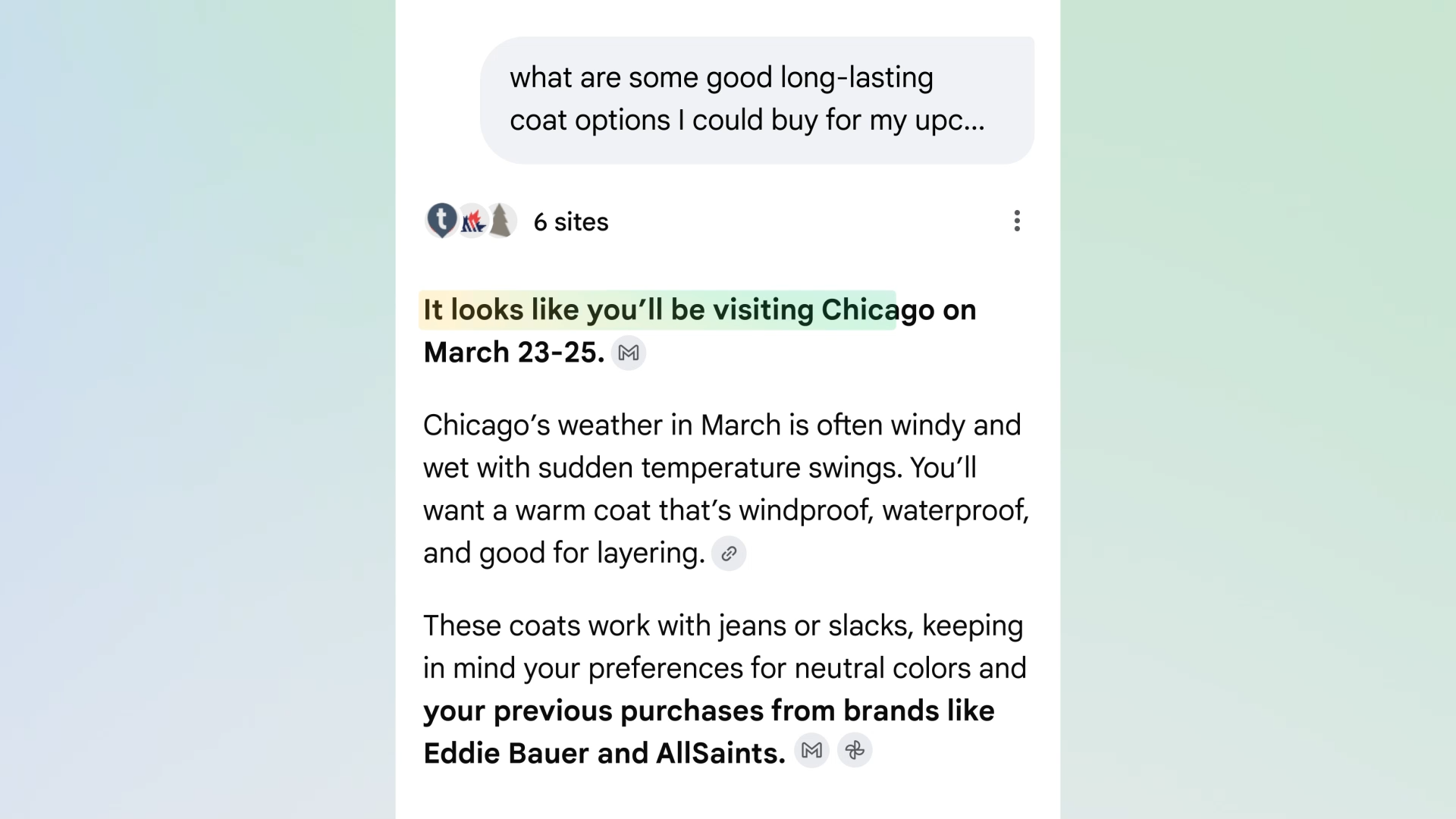
Google is working hard to change that. On January 22, 2026, the company announced that AI Mode in Google Search is gaining Personal Intelligence, an optional feature that enables Gmail and Google Photos integration so that AI Mode may better understand you. Why? Because it is convenient. You do not have to explain yourself, and Search does not have to make guesses.
Google AI Mode gets Personal Intelligence through Gmail and Photos
Google says Personal Intelligence “connects the dots” across your Google apps, which makes AI Mode feel “uniquely yours.” The feature rolls out to Google AI Pro and AI Ultra subscribers in the US, using personal Google accounts in English.
Google's own Help documents make the scope clear: “Connecting these types of apps allows all Search services to access that connected data, which includes Search, AI Mode, Discover, Maps, Shopping, News, Flights, Hotels, and Translate.”
What Google promises right away
Google’s examples are meant to be immediately useful. Want to plan a family trip? AI Mode can draw on a booking confirmation in Gmail and photos of memories to create an itinerary that fits the family’s needs. Need shopping assistance? AI Mode can look at what you buy, and especially what you tend to buy.
It’s a small change, but don’t let that fool you. The shift is bigger than it appears: from answering questions to understanding situations.
This lands after Google started rolling out Gemini-powered AI Overviews inside Gmail, and now it’s pushing that same ‘use your inbox as context’ idea into Search
Direct Offers converts your intent into a coupon trigger
Here is where the assistant story stops being neutral. It’s not like Google is making a smarter search bar. It’s making a smarter sales floor. It’s testing something called Direct Offers, which lets a retailer feature a coupon within AI Mode if it thinks the offer is relevant.
The idea is convenience, but the motivation is commerce. Once AI Mode can recognize enough context to see what you’re doing and when you’re doing it, your private confirmation email isn’t just a detail, it becomes a buying signal, and buying signals trigger deals.
The prompt trap is the part you’ll actually feel
Your Gmail remains private until you ask AI Mode to use it. When you do, slices of your inbox are included in the conversation. Google is clear about the mechanism:
A subset of the data processed by AI Mode can be reviewed by humans to debug and ensure safety. This subset can include interactions, summaries, excerpts, and inferred content. In some cases, the summary can simply be the email or file itself.
Tunnel vision is the boredom trap
Google points to a flaw it calls tunnel vision. This occurs when the computer relies too heavily on a particular inference that doesn’t really apply.
Their example is blunt: if it learns you love coffee shops, it might mistakenly make your travel plans into a coffee-shop-centric itinerary. In real life, that looks like an algorithmic echo chamber. It gives you a cleaned-up version of your habits, but it builds a wall around your curiosity. Suddenly, you’re not seeing the world; you’re seeing your own reflection.
Who can use it and what it signals next
The gate for accessing it is narrow. To use it, you have to be in the U.S., be 18+, have a paid version of Google AI, and most importantly have your entire history tracking turned on. You have to be fully in the Google universe.
This restricted rollout makes it interesting. They are differentiating themselves with their app ecosystem. They are essentially saying: if AI can use Gmail and Photos, it can be personal in a way a standalone chatbot cannot match.
The actual endgame is lock-in
Google will tell you that it’s optional, and it is. You can use AI Mode without connecting apps, and you can disconnect later.
But the lock-in isn’t a settings toggle. It’s the experience gap. Once Search starts answering like it remembers your plans, your receipts, and your patterns, switching assistants stops feeling like “trying a new tool.” It starts feeling like wiping the slate clean and going back to generic answers again.
Y. Anush Reddy is a contributor to this blog.